
Local-first desktop interview assistant
Real-time answers while the interview is still happening.
It watches the screen you choose, listens to the call, and streams an answer into a window that stays out of every screen share and recording.
- PRICING
- $8/mo or $80 once
- AI KEY
- Bring your own — OpenAI or Anthropic
- INVISIBLE TO
- Zoom · Teams · Meet · Every screenshare app
- PERSISTENCE
- None on disk
- DELIVERY
- STREAMED
- FIRST RESPONSE
- 0.2s
- PROVIDERS
- 2
- BYTES TO DISK
- 0
- TELEMETRY
- 0
What the overlay looks like mid-answer.
Answers render as real Markdown with syntax-highlighted code, so the answer and the code snippet both arrive readable.
Adjust opacity and enable click-through mode to have it in the middle of the screen.
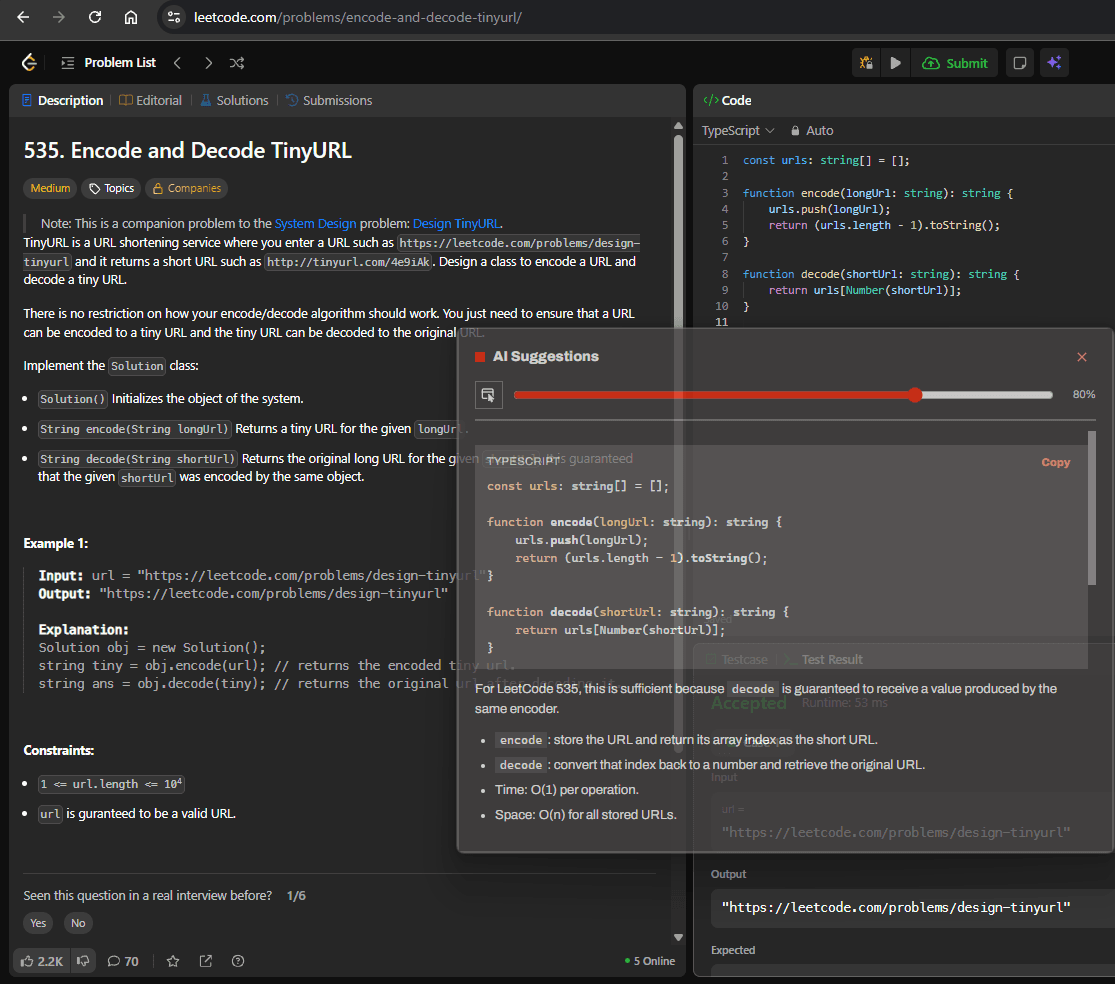
IN · TRANSCRIPT: Adjust opacity opacity and enable click-through mode to be able to position the app wherever you want for better experience — The assistant's semi-transparent AI Suggestions overlay floating over the LeetCode problem "Encode and Decode TinyURL", showing a suggested TypeScript encode and decode solution with its time and space complexity.
You already know the answers. Pressure just makes them harder to recall.
Interviews compress a career's worth of experience into a few unscripted minutes, live, while being watched. Most candidates aren't short on relevant experience — they're short on the ability to retrieve and structure it on the spot.
Freezing under pressure
The mind blanks exactly when it needs to perform — a normal response to interview stress, not a sign you didn't prepare.
Forgetting the right example
You have a dozen stories that would fit. Under pressure, the one that actually answers the question is the hardest to reach.
Losing the structure
A strong answer needs a shape — situation, action, result. Under pressure it's easy to ramble instead of land the point.
Spending energy on recall, not delivery
Every second spent remembering what to say is a second not spent on how you say it.
Everything you configure happens before the call starts.
Bind a surface
Any display or single window — the CoderPad tab, the shared deck, the call grid. A live preview confirms exactly what the model will see. Nothing is captured until you arm it.
source := display | windowMix the audio
Microphone and the call's own output are summed and transcribed by Whisper, so the assistant reads the question the same moment you hear it. Optional, and off until you switch it on.
mic + loopback → whisperRead the overlay
Answers stream into a small always-on-top card. Make it click-through and type straight past it into your editor. It stays out of every screen share and recording on the machine.
Invisilbe to screenshareThey see the call. You see the assistant.
This app's own window carries the operating system's exclude-from-capture flag. On Windows 10 build 2004 or later, screen-share tools and most recording software composite it out automatically — everything else on your desktop still shares exactly as normal.
Read the full threat modelBest-effort at the OS level, not a security guarantee — it only ever covers this app's own window, requires Windows 10 build 2004 or later, and won't hide the app from a camera pointed at your monitor. Full detail in the threat model.
Your AI spend. Your account. Your number to watch.
Most AI copilots bundle usage into the subscription — a fixed stack of “credits” priced to cover their margin on every token you send. Interview Assistant AI doesn’t. Connect your own OpenAI or Anthropic key and every request goes straight from your machine to theirs, billed at their rate, itemized in your own provider dashboard. The subscription pays for the software. Nothing else.
- MARKUP ON YOUR USAGE
- $0
- MONTHLY USAGE CAP
- NONE
- WHO SEES THE METER
- YOU
Complete control
Set spend limits, budgets, and rate caps directly in your OpenAI or Anthropic account — not in a settings panel we control.
Pay only for what you use
No bundled credits expiring at the end of the month, and no forced upgrade the moment you run out early.
Switch providers freely
Same key, same account — move between OpenAI and Anthropic as pricing or quality shifts, without waiting on a plan change.
Three steps, done once.
- 01
Install Interview Assistant AI
Download the Windows installer and open the app. Nothing else to configure yet.
- 02
Connect your AI key
Paste an OpenAI or Anthropic API key into Settings. It's encrypted at rest and never leaves this step.
- 03
Start interviewing
Pick your screen or window and go. Your provider bills you directly for what you use.
Built to stay out of the way of the interview.
- DISPLAY AFFINITY
Excluded from capture
The window carries the OS exclude-from-capture flag, so shares and recorders composite it out — while every other window on your desktop shares normally.
- HIT TEST OFF
Click-through overlay
Let the mouse pass straight through the card to the editor underneath. One global shortcut turns it back on when you need to touch the window again.
- ALWAYS ON TOP
Focus Mode
Collapse the app to a resizable card holding just the answer log. Esc restores the full window to exactly where it was.
- DELTA DETECT
Continuous mode
Re-reads the surface every half second to ten seconds. Change detection drops frames where nothing moved, so you are not paying for a static problem statement.
- AUDIO CONTEXT
Meeting audio context
Microphone and system output are summed and transcribed, so the assistant answers the question that was spoken, not just the code on the screen.
- MARKDOWN AST
Real code rendering
Fenced blocks, twenty-odd languages highlighted, and a copy button on each. Nothing arrives as a wall of escaped backticks.
- ALPHA BLEND
Adjustable opacity
Dial the window down to a 20% floor so it never turns fully transparent and unreachable. Set it once in Settings, or live from a slider inside Focus Mode.
One window. Everything reachable in a glance.
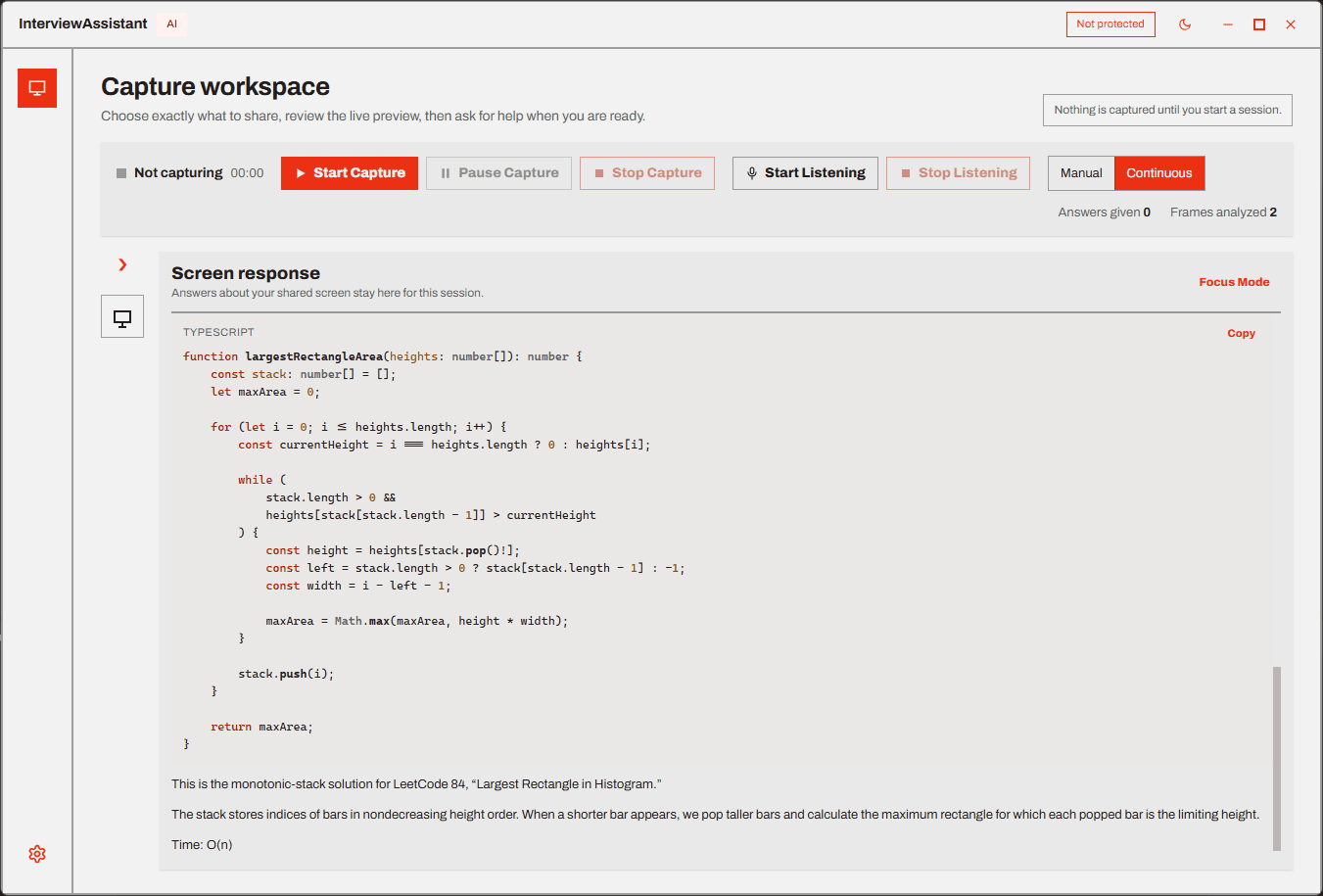
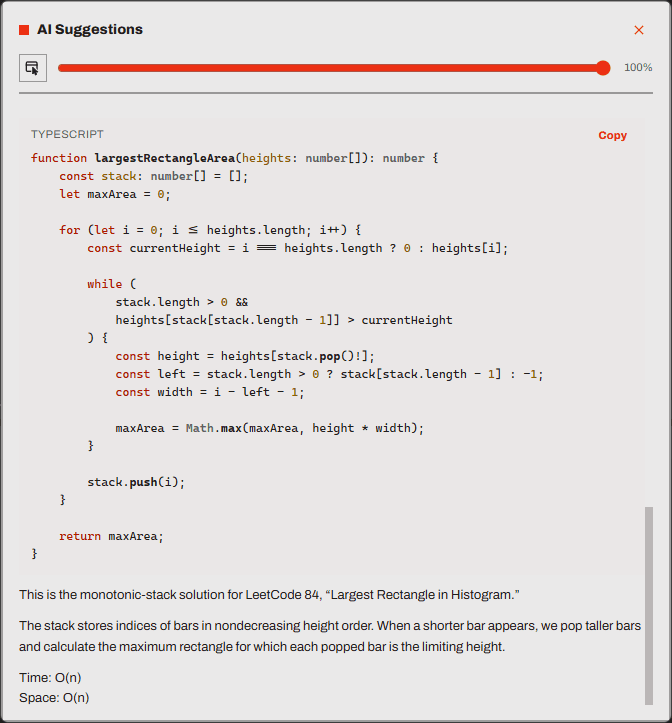
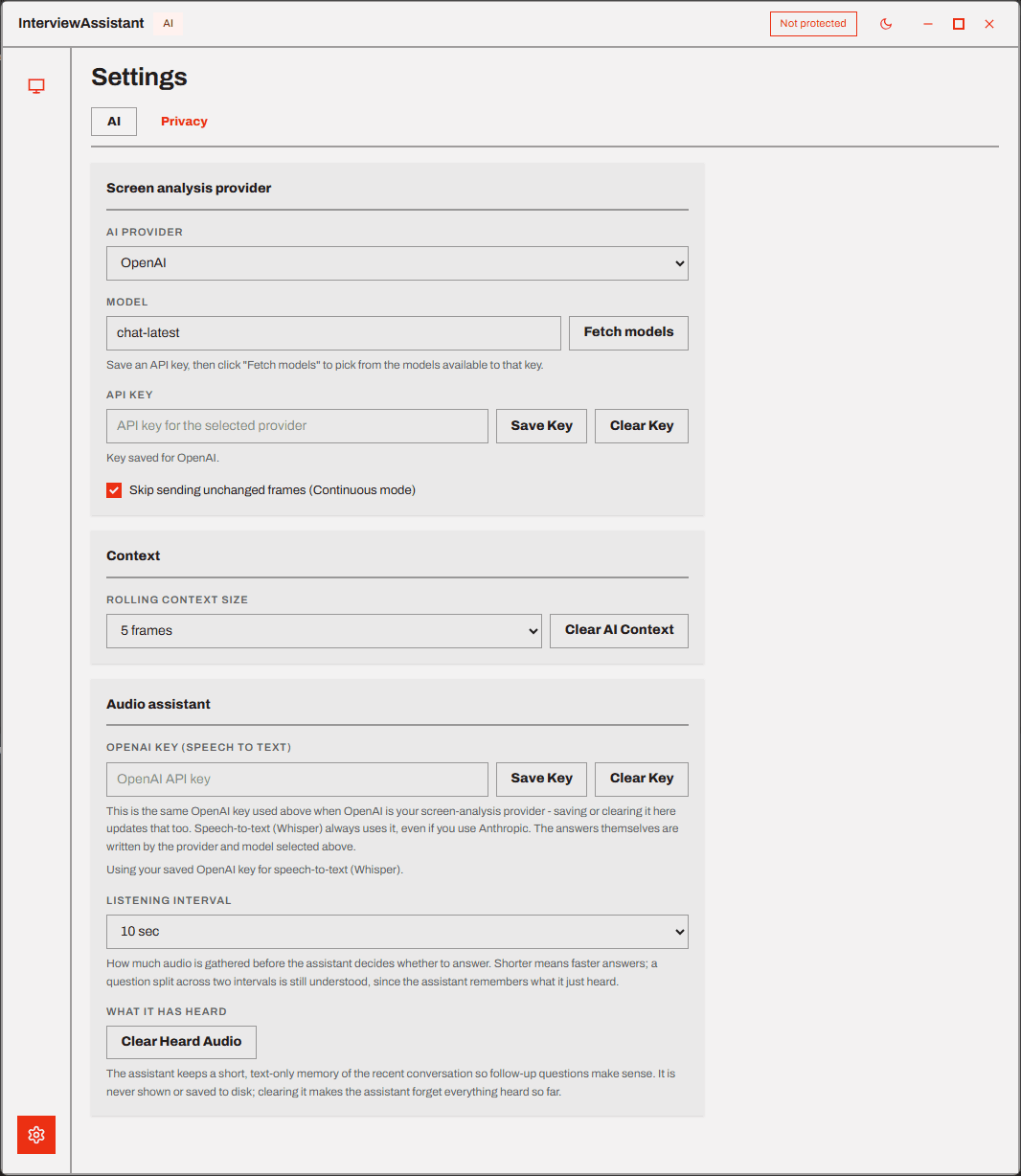
ENVIRONMENT
Windows 10 · 11
Full capture exclusion on build 2004 or later. Signed installer, x64.
macOS
In progress. Ships into every plan, including lifetime, at no extra cost.
Any call software
Zoom, Teams, Meet, CoderPad, HackerRank — it reads pixels, not APIs.
Every feature, both ways. Pick how long you need it.
Subscription
MOST FLEXIBLEFor the length of one search. Cancel any time.
- Every feature, nothing held back
- Continuous mode and meeting audio
- Updates while the subscription runs
- Bring your own OpenAI or Anthropic key
Lifetime
BREAKS EVEN AT 10 MOOne payment. Yours for good.
- Everything in the subscription
- All future updates included
- The macOS build when it ships
- Bring your own OpenAI or Anthropic key
AI usage is separate from either plan. You connect your own OpenAI or Anthropic key and pay that provider directly for the tokens you use — Interview Assistant AI adds no markup and sets no cap.
Nothing leaves the machine except one request at a time.
The only outbound traffic is the analysis call to the provider you configured, and — while listening is on — one request per audio chunk to the transcription endpoint.
Read the full modelFrames are never written to disk
A captured frame exists for the length of exactly one request, then it is gone. Only a short text excerpt of the reply is kept as context.
Audio is text-only, in memory
Recorded chunks are transcribed and discarded immediately. The transcript is bounded, lives in memory, and disappears when you quit.
Keys sealed by the OS credential store
API keys are encrypted at rest and never reach the interface layer, which runs sandboxed with no filesystem or network access of its own.
Capture cannot start silently
Screen and microphone both require an explicit start, and a persistent indicator stays on screen for as long as either is running.
Questions people ask first.
What is Interview Assistant AI?
It's a desktop application for Windows that provides real-time AI assistance during job interviews. It reads the screen or window you choose, optionally listens to the call, and streams an answer into a small overlay window while the interview is still happening.
What does BYOK mean?
BYOK stands for bring your own key. Instead of bundling AI usage into the subscription, you connect your own OpenAI or Anthropic API key, and each request goes straight from your machine to that provider — billed at their rate, with no markup added.
Is Interview Assistant AI a subscription?
It's priced as a subscription — $8 a month, or $5 a month billed annually — with a $80 one-time option if you'd rather own it outright. Every plan has the same feature set; the only choice is how long you're paying for.
What's included in the $80 lifetime plan?
Everything the subscription has — continuous mode, meeting audio context, capture exclusion, your own provider key — plus every future update and the macOS build once it ships, all for one payment with no renewal.
Why do I need my own AI key?
So your AI usage is billed at the provider's own rate, with nothing added on top. The $8 a month or $80 once pays for the app itself; OpenAI or Anthropic bills you directly for the tokens you use.
How much does the AI usage cost?
That's set by your provider, not by us, and depends on the model you pick and how often you ask. A vision request on a fast, low-cost model is typically a small fraction of a cent to a few cents; check your provider's own pricing page for exact rates, and you can switch to a cheaper model any time to control spend.
Which AI providers are supported?
OpenAI and Anthropic for the vision model that reads your screen. Meeting audio context is always transcribed by OpenAI Whisper, regardless of which provider you pick for analysis, since Anthropic has no audio-input API yet.
Does it work with Zoom?
Yes. It reads the pixels of whatever window or display you select and listens to your microphone and system audio — there's no Zoom-specific integration to break when Zoom updates.
Does it work with Microsoft Teams?
Yes, the same way as Zoom: screen and audio, not an API integration, so it works whether the call is running in the desktop app or a browser tab.
Does it work with Google Meet?
Yes. Any call software running in a window or on a display you can select works, including Google Meet, CoderPad, and HackerRank.
Can my interviewer see the assistant?
On Windows 10 build 2004 or later, this app's own window carries the OS's exclude-from-capture flag, so a screen share composites it out — the interviewer sees only what you intentionally share. It's a best-effort OS mechanism, not a guarantee, and it only ever covers this app's own window.
Does it appear in screen recordings?
The same exclude-from-capture flag applies to local recorders that use the standard Windows capture APIs, not just live screen shares. Support depends on the recorder's own capture method, and it's still best-effort — it won't hide the app from a camera pointed at your monitor.
Do I need an account?
No sign-up inside the app. You install it and unlock it with the license key from your purchase — there's no username, password, or profile to create.
Is my interview data stored?
No frame or audio chunk is ever written to disk. The rolling context and any meeting transcript are text-only, held in memory, bounded in length, and cleared when you quit or clear them yourself.
Does it work on Mac?
Not yet. Windows is where capture exclusion is fully supported today; a macOS build is in progress and will ship into every plan, including lifetime, at no extra cost.
Can I use my existing ChatGPT subscription instead of an API key?
No — a ChatGPT Plus or Pro subscription is separate from an OpenAI API key. You'll need a key from platform.openai.com, which bills per token rather than as a monthly plan, even if you already pay for ChatGPT.
How fast does an answer appear?
Answers stream token by token as the model writes them, so text starts appearing well before the reply is finished. The wait before the first token depends on the model you picked and your connection.
Your next interview is the one to be ready for.
Windows installer, $8 a month or $80 once. Download it tonight and run a mock interview against it before it matters.